Version notes and documentation scope
This guide covers AVstudio Editor 27.0.29, released October 27, 2026. On that date, the Marketplace latest manifest and the installed extension both reported 27.0.29, with VS Code 1.104 or later required. The sample workspace’s extension details also showed 27.0.29 and its new env status control.
The update was checked against the installed manifest, changelog, bundled schemas/templates, and relevant form/runtime implementation. Older screenshots retain their actual capture versions. Source review describes supported behavior; the documentation build does not establish new hardware or deployment tests.
The installation walkthrough also incorporates the AVstudio Editor Installation Manual, September 2026 edition, whose desktop installation screenshots were captured on September 29, 2026 using version 0.1.54. That source verifies extension discovery, installation, enabled state, and command availability; it does not report creating a project or testing Live Preview.
The existing Live Preview startup, device-size, and logging captures and the local-variable Modes demo are from 0.1.54. Smart Home DevTools, Quick Actions, and HTTP/WebSocket/Overlay action captures are from 27.0.5; the Button State and JSON action-body captures are from 27.0.12. These are capture versions, not the version covered by the current workflow instructions.
The original build-configuration, build-command, and build-output images and the previously inspected sample ZIP are from 0.1.54. Earlier component-property, connector, variable, datasource, and Source Control captures are also from that release. Their screenshots and archive inspection do not represent a new 27.0.29 build or physical-device deployment test.
The AVstudio Editor NG Product Guide, October 2026 edition (60 pages), adds the four-panel workspace explanation, theme/icon workflows, Crestron SSH token retrieval, connected-interface examples, and additional DevTools captures. Its examples and images supplement the existing release-specific reference; their captures are historical illustrations alongside the 27.0.29 reference. The token helper's prompts and behavior were rechecked against installed 27.0.29 source. These additions did not involve new hardware tests.
For the Product Guide's Cloud announcement, see Moving from Editor Cloud. For subscription terms checked against the official product page on October 27, 2026, see Community and Editor PRO; the PDF's per-user PRO offer and roadmap should not be read as current subscription terms.
Check the installed extension version
- In the VS Code window where you edit your project, open Extensions from the activity bar. The shortcut is Shift+Command+X on macOS or Ctrl+Shift+X on Windows/Linux.
- Find AVstudio Editor under Installed. If necessary, search for
@installed avstudio. - Click the extension published by AVstudio inc to open its details.
- On the right, find Installation → Version. The screenshot below shows 27.0.29, captured on October 27, 2026. Confirm that Identifier is
avstudio.avstudio-editor.
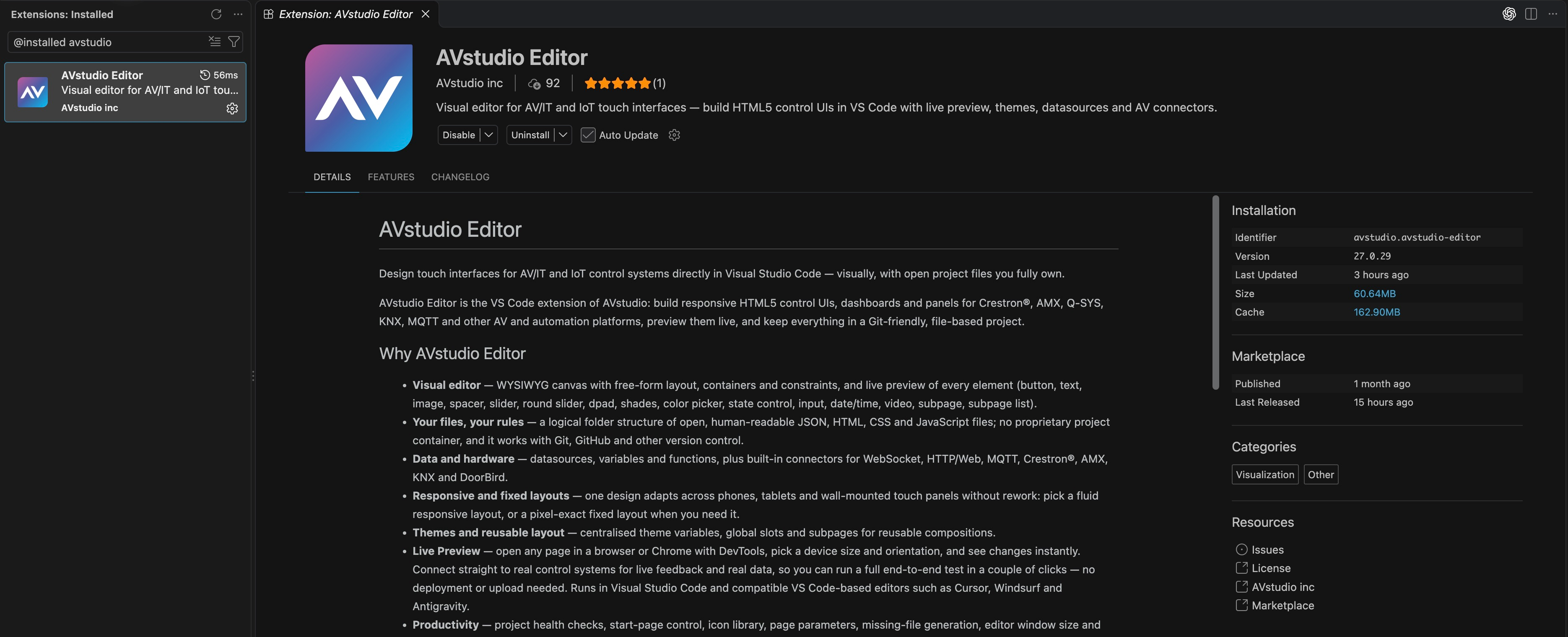
Read the version number in the Installation panel rather than using the relative Last Updated date. If the panel is outside the visible area, widen the editor window. Click the screenshot to view it at full resolution.
If the extension does not appear with the installed filter, clear the filter and search for AVstudio Editor. An Install button means that entry is not installed in the selected environment; follow the installation guide. In the screenshot, Disable and Uninstall are available because the extension is already installed. Check the same VS Code profile and local or remote environment in which the problem occurs.
Read the changelog and compare releases
On the same extension details page, select CHANGELOG, next to DETAILS and FEATURES. Find the heading matching your installed version, then read the entries between that version and the version referenced by this manual. Changes can explain a missing command, a renamed field, or a different sidebar layout.
The current documentation baseline is 27.0.29, verified against Marketplace on October 27, 2026; this page does not update automatically when another release appears. An available update and an installed release can have different version numbers. If you choose to update the extension, complete any reload requested by VS Code, then return to Installation → Version to confirm the result. Recheck your project in Live Preview and run AVstudio: Run project health check before creating a new release.
Check the version used for a build
Updating the editor does not change an archive you built earlier. To identify the extension used for a particular delivery:
- Locate the exact delivered archive, or the archive in
AVstudio UI/build/if it is still the one you need. - Open or extract a copy into a separate folder.
- Open
avstudio-meta.mdinside the archive and read Extension Version. - Record the build date and project name from the same file so the version stays associated with the correct artifact.
For example, the sample build created for this manual records extension version 0.1.54. Your currently installed extension may be newer than the one recorded in an existing archive. If metadata is missing from an older or repackaged artifact, do not infer its build version from the version installed today. See Build and deployment for archive contents and release handoff.
Extension version versus VS Code version
| Version | Where to check | What it identifies |
|---|---|---|
| AVstudio Editor extension | Extensions → AVstudio Editor → Installation → Version | The installed NG editor release and its available features |
| Visual Studio Code | Code → About Visual Studio Code on macOS; Help → About on Windows/Linux | The application hosting the extension |
| Extension used for a delivered build | avstudio-meta.md → Extension Version inside that archive | The NG release that generated the delivered application |
| Project source revision | Your Git commit or release tag, if you use Git | The editable project content used for the build |
The blue Update button in the VS Code title bar is not the extension version field. Always identify which product you are checking before reporting a version.
For a support request, include the extension version, VS Code version, operating system, affected command or file, and reproduction steps. For a deployed-project issue, also include the archive's extension version and build date. The troubleshooting guide explains where to collect logs and diagnostics.
Recent workflow changes
| Release / date | Changes and related guides |
|---|---|
| 27.0.29 · October 27 | Environment files, visibility and entrance animations, video-layer blur/background transitions, runtime API, Custom Element, Audio actions, list context, broader Health Check, legacy/component AI skills, README generation, masked connector passwords, and tab-context start-page/theme commands. |
| 27.0.24 · October 14 | Datasource-test errors in AVStudio Datasource, real certificate/DNS/connection errors, self-signed/expired TLS support in the editor tester, capped response previews, and collapsed/scroll-contained filter views. |
| 27.0.23 · October 14 | Installed-build JavaScript function execution fixed. Removed the old required env-folder/env.json model; 27.0.29 introduces optional dotenv environments. |
| 27.0.21 · October 13 | Rebuilt linear/radial gradient picker and serialized document rewrites for rapid edits. |
| 27.0.13 · October 13 | RGB Picker renamed Color Picker with a Hex variant; datasource request testing/local-data filling, data-flow timeline, formatter creation, and static-canvas notice; theme-key page transitions. |
| 27.0.12 · October 12 | Editor performance and stability improvements. No detailed fixes are enumerated in the shipped changelog. |
| 27.0.8 · October 12 | Scroll snap for responsive containers and grid Subpage Lists; theme-folder background images. |
| 27.0.7 · October 11 | Layered video/gradient backgrounds, gradient picker, theme pressed gradients, page transitions, per-theme folders/companion CSS, project theme/start-page commands, quieter MCP indicator and green Live Preview entry. |
| 27.0.6 · October 10 | JSON action bodies and context tokens, Button Pressed/Disabled states, State Control incoming binding, boolean parameter tags, per-channel RGB Join Map, and optimistic value controls. |
| 27.0.5 · October 7 | Full grouped Quick Actions; dynamic text/HTML fixes for DateTime, Dpad, and State Control; subpage editor defaults replace raw feedback tokens. |
| 27.0.4 · October 7 | Direct Crestron feedback tokens and DevTools emulation; feedback-driven modes, rich text, and per-item subpage parameters; AV Studio Hub branding; modal dynamic picker; Attach Page terminology and clearer canvas options panel. |
| 27.0.3 · October 5 | HTTP actions, dynamic action fields, authenticated AMX connections, and visual Git diffs. |
| 27.0.2 · October 4 | Live WebSocket transport, receiving into datasources/variables/parameters, sending actions, Path field and root-relative message paths, and generated AI guide coverage. |
| 27.0.1 · October 3 | Dpad Button Join Map and health diagnostics; dynamic overlay targets; removal of Call Subpage By Name. |
| 27.0.0 · October 2 | Element Picker, runtime overlays and theme Overlay section, page-parameter access, AMX creation, MCP lifecycle/status; inline datasource controls and grid-default Subpage Lists. |
Compatibility and fixes
- Overlay migration:
overlayAttachedSubpageNamewas removed in 27.0.1. Re-select the destination using Attach Page (called Attach SubPage in 27.0.1) and saveoverlayAttachedSubpage. See Overlay setup. - HTTP migration: use a required
.webconnector and an optionalrequestUrlpostfix; move the base URL into the connector host. POST/PUT/PATCH sendvalueas the body. - Join Map always sends True on press and False on release, regardless of a legacy stored behaviour.
- The Properties sidebars retain state while hidden and resynchronize when shown. Unconfigured subpages remain visible; picker drops no longer shift the canvas or misplace elements on fixed/responsive pages. Subpage datasource warning borders are no longer shown by default; warnings are opt-in per element.
- Sign In has no animated gradient; Profile is vertically centered and omits the internal User ID.
- DateTime, Dpad, and State Control resolve text tokens and HTML. In the editor, subpage input feedback tokens use the declared parameter default; live feedback is evaluated in the runtime.
Historical 27.0.6–27.0.12 migration
- In those releases, RGB Picker uses
value_r,value_g, andvalue_b(0–255), with analogchannelJoinsfor outgoing Crestron channels. Replace older hex-value/serial-feedback setup using the current Color Picker guide. - Replace Dpad
@buttonId@with@context:pressedButton@in JSON message bodies. RGB context keys are@context:red@,@context:green@, and@context:blue@. Context markers belong to JSON action bodies, not URL postfixes or ordinary serial values. - The command
avstudio-editor.markAsStartPagewas removed; useavstudio-editor.setStartPage(Set as start page). - New themes are created inside per-theme folders. Custom styling lives in active-theme companion CSS; retain old project files while migrating references instead of assuming a legacy
css/folder is still collected. - The historical 27.0.12 catalog had 16 types. The current catalog has 17 registered types, including Custom Element.
- The bundled changelog contains entries for 27.0.6, 27.0.7, 27.0.8, and 27.0.12; it does not list separate changes for 27.0.9–27.0.11.
- Fixes include token-placement errors and auto-quoting in JSON, labeled token chips and larger/full-height JSON editors, preview alignment and empty-field edit icons, safe generated action names, correct false/0 boolean parameter text, round-slider dragging and pressed-state coercion, and connector host/path slash handling.
Upgrade to 27.0.29
- Back up or commit the editable project before migration, then update the extension and complete any reload prompt.
- Refresh the bundled AI guidance with Generate AVStudio skill after preserving custom guide edits. The current bundle includes guide, custom-element, and legacy-import workflows.
- Replace older
env/env.jsonassumptions with optional dotenv files. Review existing Git ignore rules; new projects ignore private env files and build output, but existing repositories need their own review. - Review Color Picker variants and bindings. RGB channels and Hex serial values use different action contexts and only RGB offers channel Join Map.
- Configure page transitions through theme keys. Existing companion CSS remains supported and can override generated preset rules. Older themes now receive missing built-in defaults.
- Prefer dotless
archiveType: "zip"or"ch5z"; dotted legacy values are accepted. Select splash images through the image dropdown. - Run Health Check, address its expanded diagnostics, and test commands, feedback, custom components, audio, and animations in Live Preview and the target runtime. Choose the production env independently when building.
The 27.0.29 fixes also cover invalid empty Web header names, unset boolean selectors, unresolved Round Slider values, busy preview ports, immediate response to bound toggle-state changes, and non-string image references. The manifest contributes 53 commands (including 11 JavaScript snippet commands) and six settings. See Commands and Settings for their exact names. The current form/runtime uses audioSrcPath for Audio actions, although older bundled schema notes still mention audioSrcTargetByName.
Scope and limits
The guide distinguishes enabled extension commands from planned integrations. AMX creation and authenticated WebSocket connections are available; AMX variable read/write is not yet implemented. RTSP video needs App Container. No direct public Cloud-download/import command is registered; the bundled legacy-build importer provides a separate staged migration workflow from an existing build.
Instructions derived from the bundled references describe intended behavior. The site build validates documentation routes and markup; it does not certify every connector, account entitlement, or hardware deployment. Confirm site-specific behavior on the actual runtime.
For account availability and product announcements, consult AVstudio Editor NG. For documentation corrections, include the extension version and the relevant command or file format when contacting support.