AVS-10 / AVS-15 Touch Panels
Simple, flexible room control powered by modern HTML5 interfaces.
AVS-10 and AVS-15 are professional, commercial-grade PoE+ touch panels engineered specifically to run high-performance HTML5 user interfaces, control systems, and automation dashboards. Powered by App Container, these panels provide a unified, approachable interface for room control, workspace scheduling, smart building automation, and multimedia management.
⚡ At a Glance
- Two Sizes: Available in 10.1-inch (AVS-10) and 15.6-inch (AVS-15) fully laminated IPS display options.
- Single Cable Installation: Powered via IEEE 802.3at PoE+ for combined power and gigabit network connectivity.
- On-Board Control Interfaces: Integrated RS-232, RS-485, relay, digital I/O, and IR ports for direct equipment control without requiring external adapters.
- Environmental & Status Intelligence: Built-in temperature/humidity sensors, ambient light sensor, 5 MP camera, dual microphones, speakers, and a programmable multicolor RGB LED status bar.
- App Container Pre-Installed: Pre-configured out of the box with the App Container Runtime, delivering native-speed execution of HTML5 web UIs with local asset caching, offline capability, zero-latency interaction, hardware control bridges, and CORS/SSL bypass.
- Custom Android App Recall: Authorized integrators can load approved custom Android apps and launch them directly from within the HTML5 touch panel interface.
🖼️ Hardware Design & Views
Front View
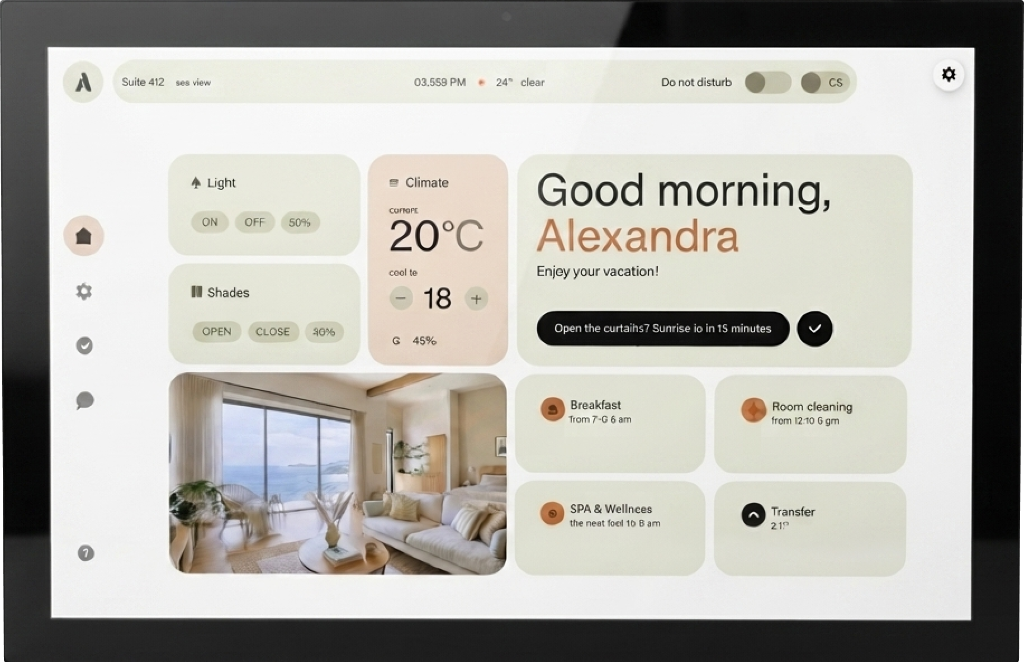
Fully laminated 10.1" / 15.6" IPS capacitive touch display with programmable RGB bezel LED status bar.
Side Profile
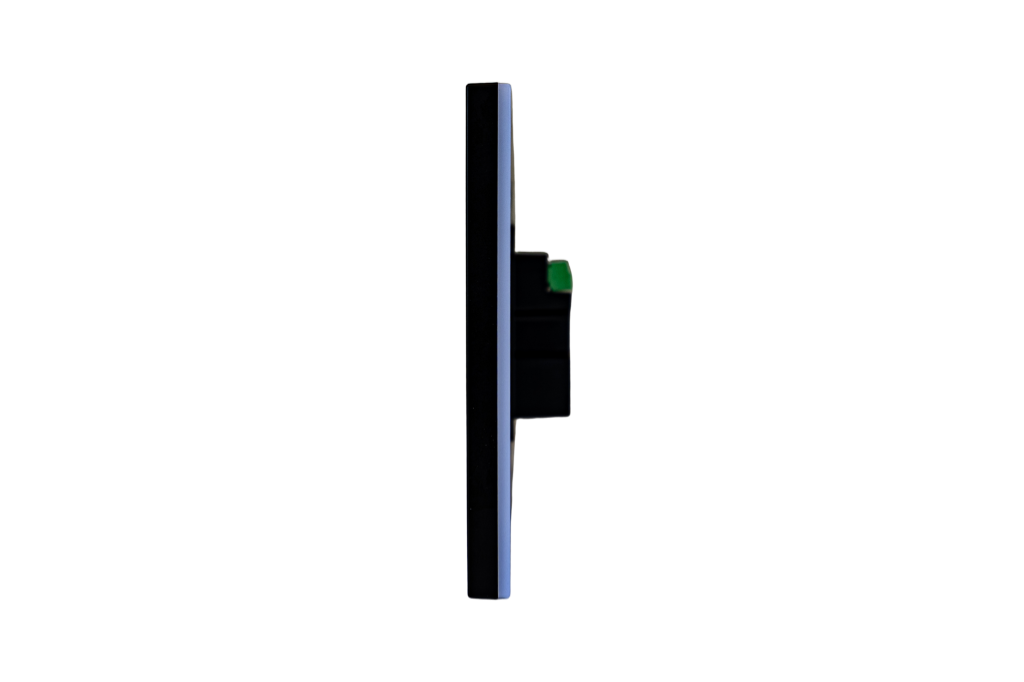
Ultra-slim depth profile designed for flush surface wall mounting and gang-box alignment.
Rear Connectors
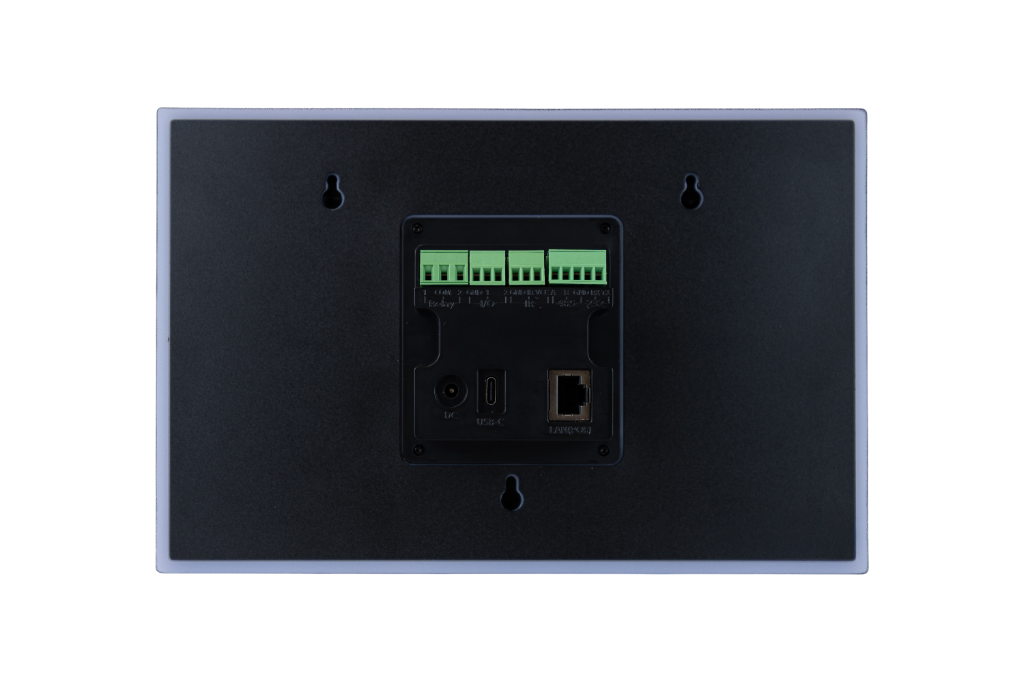
On-board terminal blocks for Relay, I/O, IR, RS-485, RS-232, 12V DC, USB-C, and PoE+ Gigabit LAN.
📊 Technical Specifications Matrix
| Feature | AVS-10 | AVS-15 |
|---|---|---|
| Display Size | 10.1-inch IPS | 15.6-inch IPS |
| Resolution | 1280 × 800 (16:10 ratio) | 1920 × 1080 (16:9 ratio) |
| Touch Technology | Fully laminated, 10-point capacitive touch | Fully laminated, 10-point capacitive touch |
| Operating System | Android 14 Core | Android 14 Core |
| Processor & Memory | Quad-Core CPU, 4 GB RAM, 64 GB Storage | Quad-Core CPU, 4 GB RAM, 64 GB Storage |
| Runtime Engine | Pre-installed App Container | Pre-installed App Container |
| Network Interfaces | Gigabit Ethernet (RJ-45), Wi-Fi 6, Bluetooth 5.3 | Gigabit Ethernet (RJ-45), Wi-Fi 6, Bluetooth 5.3 |
| USB Connectivity | USB-C OTG | USB-C OTG |
| Power Requirements | IEEE 802.3at PoE+ or 12 VDC (12V / 1.5A adapter) | IEEE 802.3at PoE+ or 12 VDC (12V / 2A adapter) |
| Serial Ports | 1 × RS-232, 1 × RS-485 | 1 × RS-232, 1 × RS-485 |
| Relay & I/O | 1 × Relay output, 1 × Digital I/O | 1 × Relay output, 1 × Digital I/O |
| IR Port | 1 × IR Transmitter | 1 × IR Transmitter |
| Status Lighting | Programmable RGB LED light bar on bezel | Programmable RGB LED light bar on bezel |
| Environmental Sensors | Temperature & Humidity sensors, Ambient light sensor | Temperature & Humidity sensors, Ambient light sensor |
| Audio & Video | Dual Microphones, Stereo Speakers, 5 MP Front Camera | Dual Microphones, Stereo Speakers, 5 MP Front Camera |
| Mounting | Wall Mount (Surface / In-wall box compatible) | Wall Mount (Surface / In-wall box compatible) |
| Dimensions (W × H × D) | 243.07 × 159.67 × 38.15 mm | 363.25 × 225.99 × 38.15 mm |
| Weight | 0.7 kg | 1.4 kg |
| Finish Options | Black or White | Black or White |
🛠️ Architecture & Installation
Clean Installation with PoE+
A single Category network cable delivering Power over Ethernet (IEEE 802.3at PoE+) handles both power and gigabit network connectivity. For environments where PoE is unavailable, an optional 12 VDC power adapter can be used.
Flexible Operation Topologies
AVS touch panels accommodate three primary deployment models:
- Control Processor Companion: Interfaces seamlessly with established room-control processors (Crestron®, AMX®, QSC®, Extron®).
- Direct Service Connection: Connects directly to cloud or local network services, REST APIs, or WebRTC video servers.
- Hybrid Architecture: Combines local room control processor logic with direct cloud/network service API calls simultaneously.
       +-------------------------------------------------------------+
       |                  AVS-10 / AVS-15 Touch Panel                |
       |  +-------------------------------------------------------+  |
       |  |                 App Container Runtime                 |  |
       |  |  [ HTML5 UI ]   [ Local Cache ]   [ Android 14 Core ] |  |
       |  +-------------------------------------------------------+  |
       +-------+--------------------+---------------------+----------+
               |                    |                     |
     PoE+ / Gigabit LAN         On-Board Ports         Wireless
               |                    |                     |
     +---------+---------+   +------+------+      +-------+-------+
     | Control Processor |   | RS-232/485  |      | Wi-Fi 6       |
     | Web Server / APIs |   | Relay / I/O |      | Bluetooth 5.3 |
     | Video Streaming   |   | IR Control  |      | USB-C OTG     |
     +-------------------+   +-------------+      +---------------+
🚀 Key Features & Capabilities
⚡ Powered by App Container
Both panels come factory pre-loaded with App Container, the dedicated runtime engine and hardware bridge that turns the touch panel into an enterprise-grade control station:
- Native Hardware Access: Control onboard relays, GPIO, RS-232/485 serial ports, and RGB bezel lighting directly from browser JavaScript via the JavaScript Bridge API or over the network via the Remote Hardware API.
- Instant Project Deployment: Load
.zipor.ch5zHTML5 project bundles over local network, USB, or the web management dashboard. - Offline Asset Caching: HTML5 assets, fonts, graphics, and scripts execute directly from internal storage with zero cloud dependencies.
- Network Proxying: Transparently bypasses CORS restrictions and handles self-signed SSL certificates for smooth integration with local network hardware.
- Built-in Video & Telephony: Embedded RTSP streaming engine (Streaming API), WebRTC bridge (WHEP Proxy), and full SIP VoIP stack (Intercom / SIP API).
- Remote Management & Diagnostics: Built-in web dashboard at
http://{panel-ip}:8080/manageand 5-finger technician access directly on screen.
📱 Custom Android App Integration
In addition to HTML5 web projects, authorized providers can install approved native Android applications on the device platform. Integrators can configure the HTML5 UI to trigger, launch, or recall these native Android apps seamlessly, allowing specialized tools (e.g. video conferencing apps, custom camera viewers) to coexist with the room control interface.
💡 Programmable RGB Status Bar
The integrated RGB status light bar mounted on the bezel provides immediate visual telemetry. Program light patterns and colors directly via the JavaScript Bridge API or the Remote Hardware API to signal room availability, call alerts, security warnings, or custom workflow status.
🌡️ Built-In Environmental Telemetry
High-precision onboard temperature and humidity sensors monitor ambient room conditions in real time, exposing metrics to your control UI or facility management system without requiring external sensor modules.
📞 SIP & SIP Intercom Support
Native SIP protocol stack integration enables two-way VoIP audio and video intercom communication using onboard dual microphones, stereo speakers, and 5 MP camera. Connects directly with IP door stations (DoorBird, 2N, Mobotix), IP PBX servers, and peer panels. Web applications can control calls, position video windows, and listen to telephony events via the Intercom / SIP JavaScript Bridge API.
🎯 Use Cases & Applications
AVS-10 and AVS-15 are versatile surfaces designed for diverse commercial, corporate, residential, and institutional environments:
+-----------------------------------------------------------------------+
|                         AVS TOUCH PANEL USE CASES                     |
+-------------------+-------------------+-------------------+-----------+
| Executive &       | Training &        | Workspace & Room  | Operations|
| Conference Rooms  | Classrooms        | Scheduling        | Dashboards|
+-------------------+-------------------+-------------------+-----------+
| • Source Switch   | • Preset Recall   | • Live Availability| • Facility|
| • Volume / Audio  | • Presentation    | • Check-in/Extend |   Telemetry|
| • Conferencing    | • Instructor Help | • RGB Status Bezel| • Device  |
| • Shade / Climate | • System Health   | • Calendar Sync   |   Health  |
+-------------------+-------------------+-------------------+-----------+
1. 💼 Corporate Conference Rooms & Boardrooms
- Centralized AV Control: Select input sources, adjust multi-zone audio levels, control displays/projectors, and manage room lighting or motorized shades.
- Unified Conferencing: Launch WebRTC/WHEP stream previews, control Zoom Rooms or Microsoft Teams calls, and manage microphone muting from a single touchscreen.
- Environmental Comfort: Monitor and adjust HVAC temperature and humidity settings directly from the meeting table or wall.
2. 🎓 Training Facilities & Higher Education
- One-Touch Presets: Instructor can recall pre-configured scene modes (e.g. "Lecture Mode", "Group Discussion", "Video Screening").
- Presentation System Switching: Route document cameras, podium PCs, and wireless presentation devices to main classroom displays.
- Instant Help Desk Request: Trigger alert notifications to AV/IT support staff with room diagnostic information.
3. 📅 Room Scheduling & Workspace Management
- Wall-Mounted Outside-Room Display: Mount outside meeting rooms to show current availability, upcoming meetings, and instant booking options.
- Visual Status Indication: The programmable RGB LED light bar displays room status visible down the hallway (e.g., Green = Available, Red = Occupied / Do Not Disturb, Yellow = Reserved / Starting Soon).
- One-Tap Check-In: Prevent ghost meetings by requiring on-screen check-in upon arrival.
4. 🏡 Smart Residential & Hospitality (GRMS)
- Guest Room Management Systems: Provide hotel guests or homeowners with an intuitive dashboard for lighting scenes, HVAC control, motorized drape operation, and media selection.
- Guest Services Request: Enable room service ordering, housekeeping requests, or "Do Not Disturb" toggles directly from the panel.
5. 🏢 Building Automation & Facility Operations
- System Telemetry: View live facility metrics including ambient temperature, humidity levels, energy consumption, and lighting status.
- Device Health & Diagnostics: Display active alert conditions, network connectivity status, and hardware health for facility managers.
🔗 App Container Software & Hardware APIs
AVS-10 and AVS-15 touch panels run App Container as their complete operating software layer. Developers have full access to hardware and communication subsystems through both in-app JavaScript and external network APIs:
- 🔌 JavaScript Bridge API: Interact directly from inside your HTML5 project with zero network latency (
window.appcontainer.gpioBridge,streamBridge,sip). Control relays, GPIO pins, RGB LED bezel patterns, UDP packets, and launch OEM apps. - 📞 Intercom / SIP API: Native SIP audio and video calling between panels, DoorBird/2N door station monitoring, broadcast paging ("Page All Panels"), and native video overlays.
- 🎥 Streaming API (Native Player): Hardware-accelerated, ultra-low latency RTSP camera streams rendered directly over HTML elements using Flutter's native
libmpv/FFmpegengine. - 🌐 WebRTC / WHEP Proxy: Embedded WHEP gateway converting local RTSP feeds to standard browser-compatible WebRTC
<video>elements. - 📡 Remote Hardware REST API: Control the panel's physical hardware externally from third-party control systems or scripts over HTTP (
/api/remote/*). - 🛠️ Remote Management Dashboard: Access
http://{panel-ip}:8080/managefrom any browser on the local network to switch projects, deploy packages, view snapshots, and inspect diagnostics.
🛡️ Warranty & Technical Support
- Standard Warranty: Includes a 3-year limited hardware warranty.
- Display & Touch Overlay: Covered by a 1-year limited warranty.
- DOA Policy: Defective-on-arrival products must be reported through an authorized AVstudio provider within 30 days of delivery.
- Authorized Installation: Contact an authorized AVstudio integrator or provider to confirm availability, network design, UI programming, and mounting hardware options.